 Wino Mail
Wino Mail started as a Windows mail client. Today one repository builds a mail, calendar, contacts and To Do client for Windows, macOS, iOS, iPadOS and Android, and a Linux version is taking shape on its own branch. Every one of those applications is native to its platform, and every one of them runs the same .NET backend.
Where each app stands today: Wino Mail for Windows is available now, and the macOS app is in beta. The iOS, iPadOS, Android and Linux apps have not been distributed yet. They are built and tested every day in the setup this post describes, and they are on their way.
This post is about how that works: the architecture that lets five user interfaces share one engine, the push relay I built so phones get mail instantly without giving up privacy on the desktop, the remote mail lab every change is tested against, and the tooling that lets several AI agents work on Wino at the same time without stepping on each other. That last part changed how Wino is developed more than any single technical decision, so most of this post leads up to it.
One backend, many native heads
The rule behind the whole codebase is simple: business logic lives once, in shared .NET code, and each platform only adapts it. Synchronization, the database, the request pipeline, account setup, the ViewModels and even most presentation logic are shared. A platform head draws the screens and supplies what only an operating system can: secure storage, notifications, windows, a web view, a sign-in surface.
This was not the first plan. I tried cross-platform UI frameworks first. Uno Platform was too slow for a mail client's lists and reader. .NET MAUI was faster than Uno, but it still slowed down under real mailboxes, and its components were hard to bend to the design Wino needs. Neither passed Wino's performance bar. Wino is known for being fast on Windows, with Native AOT and a UI that does not stutter, and it would have been a strange way to expand: take an app people like for its speed and ship a laggy version of it everywhere else.
So each head uses the native toolkit its platform's users expect, and it is still all C#. The Apple heads use .NET for iOS and .NET for macOS, which bind UIKit and AppKit directly, and the Android head uses .NET for Android over the platform's own Views, AndroidX and Material components. There is no abstraction layer between the code and the platform's UI, only the shared backend underneath:
| Platform | Head | UI toolkit | Runtime | Status |
|---|---|---|---|---|
| Windows | Wino.Mail.WinUI | WinUI 3, MSIX | Native AOT | Available |
| macOS | Wino.Mail.MacOS | AppKit | CoreCLR | Beta |
| iOS and iPadOS | Wino.Mail.iOS with Wino.Mail.UIKit | UIKit | Mono | Coming soon |
| Android | Wino.Mail.Android | Android Views, AndroidX, Material | Mono | Coming soon |
| Linux | Wino.Mail.Linux (own branch) | GTK 4 and libadwaita through Gir.Core | CoreCLR | Coming soon |
Below the heads, the layering looks like this:
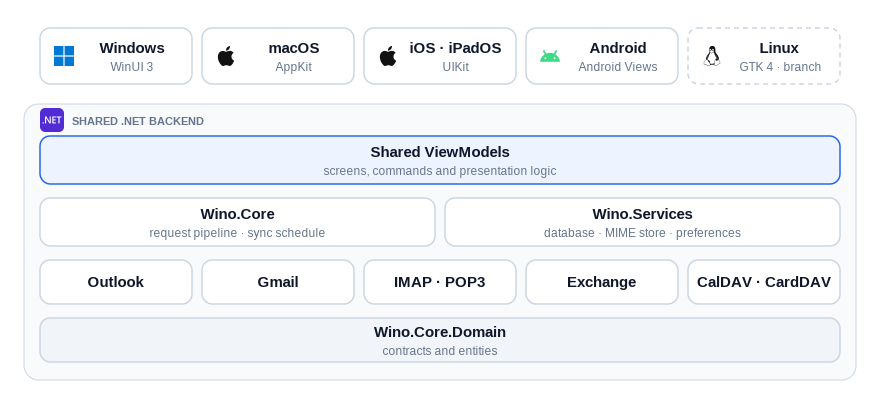
A few decisions make this hold together.
The domain stays thin. Wino.Core.Domain holds contracts, entities and message records. It does not depend on MimeKit or on an MVVM toolkit, so anything can reference it, including the iOS notification extension, which has to stay tiny.
Each provider is one project. Outlook, Gmail, IMAP, Exchange and DAV each carry their authenticator and synchronizer together. A provider registry replaced the old factory switch, so adding a provider means registering it, not editing a dozen branches.
The UI never waits for the database to lie to it. Every change a user makes goes through one request pipeline. The UI applies the change in memory at once, the request is sent to the server, and only when the server confirms it does the local database change. If the server refuses, the in-memory change is reverted. There is no offline queue and no retry queue. That rule sounds strict, but it is what lets five different UIs trust the same database: no head ever has to reconcile a local state the server never agreed to.
Release builds stay honest. The Windows app ships with Native AOT and full trimming, and the shared projects build with warnings as errors under the same analyzers. A custom analyzer (WINOAOT001) rejects collections that would break AOT data binding. Nullable warnings are treated as defects, not noise. The Apple and Android heads are exempt from the AOT gate only because their runtimes work differently.
The push relay: instant mail without giving up privacy
On a desktop, keeping mail fresh is easy: the app holds an IMAP IDLE connection and timers cover the rest. On a phone that does not work. iOS will not let an app keep a socket open in the background, so every iOS mail client with instant IMAP notifications runs a server.
Wino now has one too: WinoRelay, a .NET 10 service published with Native AOT. Its job is narrow. It learns that a mailbox changed and rings a doorbell. It never reads message bodies, and the app still runs its own delta sync.
The hard part was not the push. It was deciding what the relay is allowed to know, especially for desktop users who never needed a server before.
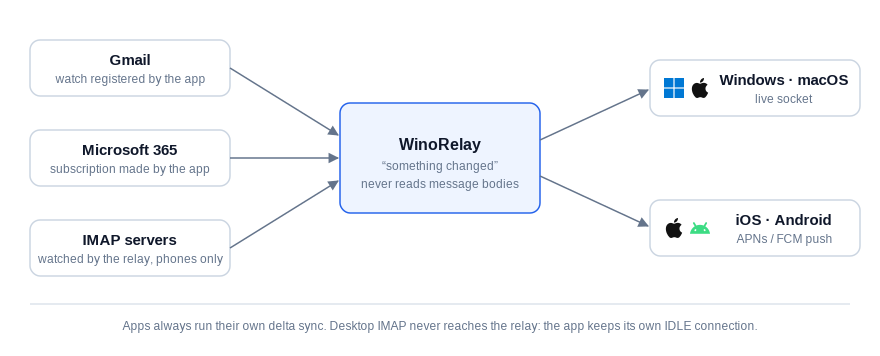
- Gmail and Outlook tokens never leave the device. The app registers the Gmail watch and the Graph subscription itself. The relay learns only "this mailbox changed" and never calls those APIs.
- Desktop IMAP never goes to the relay. Windows and macOS keep their own IDLE connection, so a desktop user's IMAP password never sits on a Wino server.
- No account is required. Every install has its own device identity and can use the relay from the first launch. A Wino Account is optional.
That last rule created the hardest problem: without accounts, what stops a script from registering thousands of fake mailboxes? Phones have platform attestation (App Attest, Play Integrity). Desktops have nothing equivalent. My answer is a key bound to the machine, kept in the TPM on Windows and the Secure Enclave on a Mac, that signs every credential request.

It does not prove the binary is Wino, but a stolen credential is useless off the machine that holds the key.
Device identity is only the first layer. Both the Wino API and the relay run their own abuse safeguards on every registration and every connection, and they act on their own when something looks wrong, whichever platform it comes from. I will not list the rules here, since a published rulebook is a guide for getting around it, but they are there, and they are what keep the relay for Wino users without forcing anyone to sign in.
The mail lab: real servers, on demand
A mail client lives and dies by the servers it talks to. IMAP alone has a dozen ways to say the same thing: QRESYNC, CONDSTORE, servers that only know UIDs, different folder delimiters, namespaces, servers that forget everything on restart. Testing against a single personal account finds almost none of the interesting bugs.
So Wino has a mail lab: a permanent Linux host that runs a set of real mail servers, each with a different personality, all with public TLS certificates and their own names.
| Server | What it exercises |
|---|---|
| Dovecot | QRESYNC, . delimiter, the hub that routes mail between lab domains |
| Dovecot (CONDSTORE only) | servers without QRESYNC |
| Stalwart | IMAP4rev2, / delimiter, built-in CalDAV and CardDAV |
| GreenMail | UID-only, in-memory, no authenticated submission |
| Apache James | QRESYNC advertised, in-memory |
| Cyrus | INBOX. namespace and shared folders |
| POP3 | UIDL, TOP, SASL |
| OAuth Stalwart | OIDC, dynamic client registration, XOAUTH2 and OAUTHBEARER |
Around those servers sit the pieces that make the lab useful rather than just available:
- a flaky host, the Dovecot server behind Toxiproxy, where a test can add latency, timeouts, resets or a full outage for a few minutes;
- certificate endpoints that are valid, wrong-host, expired or revoked;
- discovery domains with real autoconfig XML, SRV and well-known records, so account discovery is tested against DNS, not a stub;
- a corpus of 95 pathological messages (broken encodings, odd MIME trees, giant headers) in every account;
- a scale mailbox with 20,000 messages;
- and a control API that ties it together.
The control API is what turned the lab from a test environment into an agent environment. Agents never share an account. They lease pool accounts, which the lab resets to a known seed, and give them back when they are done.
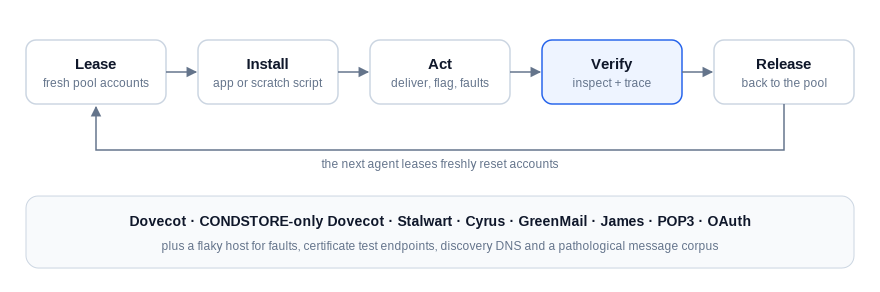
The loop is always the same: lease accounts, put them into Wino, change the mailbox from the server side as if another device did it, then compare what Wino shows with the server's own truth (inspect) and read the IMAP commands Wino actually sent (trace). When an agent claims a sync bug is fixed, it can show the folder's UIDVALIDITY and MODSEQ before and after, and the exact commands that moved them.
One rule matters a lot here: a machine needs only a single manifest file to use the lab. If it is missing, agents refuse to run lab tests rather than hunting for credentials elsewhere, and the lab password and control token are redacted from everything the client prints.
Running the backend without an app
For a long time, verifying a backend change meant building and launching the Windows app, clicking through it, and reading logs. That is slow for a person and far slower for an agent.
I restructured the backend so that everything except the UI and app launch can run from a single C# file. The Wino.Hosting project is a host that starts the same services, runtime, database and ViewModels the apps use, without any app. A script references it with a #:project directive and runs with dotnet run:
#:project D:/Wino-Mail/src/Wino.Hosting/Wino.Hosting.csproj
#:property TargetFramework=net10.0
using Wino.Hosting;

await using var wino = await WinoHost.StartAsync(o => o.DataRoot = args[0]);

var lease = LabLease.Load(args[1]);
var account = await wino.AddImapAccountAsync(lease.Account("stalwart"), LabAccountModes.AllThroughDav);
await wino.SynchronizeAsync(account);
The host has strict rules. Nothing in it replaces backend data. It supplies what a screen or an operating system would: a real single-threaded dispatcher with an ordered queue, a real navigation lifecycle, dialogs that the script answers (or that are dismissed and recorded), and notifications that are printed instead of shown. It never substitutes a service result, a network reply or a database row. There are no mocks and no fakes anywhere in the repository, and no test projects either. Every check runs the real code against real servers.
That sounds like a philosophical choice, but it is mostly a practical one. A mock tests what you think the server does. The lab tells you what it actually does. During the restructure, one suite of nine throwaway scripts ran 150 checks against the lab in 13 minutes: initial and delta sync on three different IMAP servers, read, flag, move, archive and delete, drafts and sending, CalDAV create, edit and invitation answers, contacts, tasks, app lock, and account removal. Because the scripts live in a scratchpad and not in the repository, they cost nothing to maintain. The next agent writes the scripts it needs for the change in front of it.
The host is portable by design: no Windows, Apple or Android API. That is also why the backend builds and syncs on Linux, which made the Linux client possible.
Verifying the UI: winapp and Windows Sandbox
Backend scripts cannot prove that a button is in the right place. For that, agents drive the real Windows Debug app through Microsoft's WinApp CLI.
winapp run builds, registers and activates the MSIX package, and winapp ui drives it through UI Automation: search for an element, invoke it, wait for another, type into a field, take a screenshot or record a short video. Because those commands resolve elements from the accessibility tree, every interactive control in Wino needs an accessible name. A maintenance script reports the gaps, so UI testability and accessibility improve together.
The rule for agents is that a passing build proves nothing about the UI. A UI check is reported as done only when it was performed, with the screenshots or recording attached and a note of what was clicked and what was seen. No UI test suite is checked in. Each check is ad hoc, written for the change at hand.
That worked well for one agent. It broke down with several. Debug builds share one package identity, so two agents deploying at the same time overwrote each other's app. The answer was Windows Sandbox: a disposable, clean Windows instance that WinApp CLI can deploy into with --on sandbox.
Sandbox had its own surprise: it ships without the WebView2 Runtime. Wino renders mail and runs its composer in WebView2, so in a fresh Sandbox the reader was blank and the composer did not load. The guest also should not download anything on its own. The fix was a fixed-version WebView2 runtime, extracted once on the host from Microsoft's signed package, copied into the guest before every launch, given read access for app packages, and pointed to with the WEBVIEW2_BROWSER_EXECUTABLE_FOLDER machine variable.
The second surprise was credentials. Wino on Windows protects secrets with DPAPI, which is bound to the user profile, so a database generated on the host cannot be read inside the guest. The lab's database generator is therefore published self-contained, copied into the Sandbox and run there, so the secrets are protected by the guest's own user.
Today one helper does all of it:

Every Sandbox launch opens with lab accounts and a working reader. A separate mode starts it empty, for work on the welcome window and account setup.
Many agents, one codebase
Everything above exists for one reason: so more than one agent can work on Wino at the same time and every one of them can prove its work.
Development runs on two personal machines. The Windows PC develops the Windows app and coordinates everything. A Mac builds and tests the macOS, iOS and Android apps through a Claude Code session that the Windows coordinator starts over SSH. The Linux client is developed in its own session inside an Ubuntu Hyper-V virtual machine on the same Windows PC. Shared code can change on any of them, and they stay in step through the Git remote.
No build farm, just two computers on a desk
It is worth saying plainly what "several agents in parallel" runs on. The orchestrator, the worktree agents, every Windows build, the Release gate, Windows Sandbox and the Ubuntu Hyper-V machine for the Linux session all run on my gaming PC with 32 GB of RAM. Every macOS, iOS and Android build, the iOS Simulators and the Android emulators run on an original M1 Mac mini. There is no CI fleet, no cloud build machine and no DevOps team behind any of it.
That is not a stylistic choice. Wino does not make much money, and most of what it does make goes to the servers users actually depend on: the backend that holds Wino Accounts, the website and the push relay. The mail lab is the one extra host, and it is deliberately small. Everything else has to fit on hardware I already owned.
The constraint shaped the tooling more than any architecture document did. Agents build but do not deploy, because two Debug installs on one PC collide. UI checks for a batch of fixes run once, in one Sandbox, because one Sandbox is what the PC can spare while agents keep building. Mac jobs queue behind a lock, because the Mac mini can run one Xcode-heavy job at a time. Each of those rules exists because the machine said no first.
And honestly, it is fun. Watching a gaming PC coordinate agents in four worktrees while a Mac mini across the desk boots an iPhone Simulator for the same change feels like running a small studio out of a bedroom.
A typical round of bug fixing now looks like this:
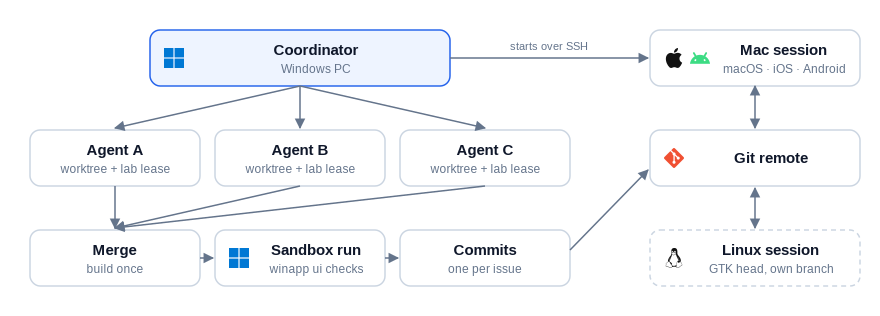
Each agent works in its own Git worktree, on a branch named after its issue. It leases its own lab accounts, so no two agents fight over a mailbox. It builds and checks backend behavior with scratch scripts, but it does not deploy the app. The coordinator merges the branches into one integration branch, builds once, and runs a single Sandbox session that walks through every issue's checks. That catches cross-branch conflicts that per-branch testing never would, and avoids the package identity collision entirely. Each fix still lands as its own commit with a Refs: #N trailer, because release notes are drafted from those commits.
A few things made this work in practice.
Guidance lives next to the code. Every project has an AGENTS.md with its hard stops, how its code is checked, and its performance rules. The root file is a map. An agent that edits the IMAP provider reads the IMAP provider's rules, not a 2,000-line handbook. When the restructure added a project, its AGENTS.md came in the same change.
Rules are enforced by the build, not by trust. Namespaces must match folders (IDE0130 is an error). Collection types that would break AOT binding are rejected by an analyzer. Nullable warnings fail the Release gate. An agent cannot quietly suppress a warning to get green, because the Release settings are not allowed to be weakened.
A report is not proof. The coordinator treats every agent's summary as a claim. It reads the diff, the logs and the screenshots before telling me anything is done. The Mac session's result is checked over SSH the same way.
Hard stops are written down. Some things no agent may touch: OAuth client registrations, signing identities and provisioning profiles, production infrastructure outside the lab. Those are listed in the guidance in plain language, so an agent asks instead of guessing.
The effect on development speed is hard to overstate. The shared backend restructure (splitting providers into their own projects, moving Windows services out of the head, adding Wino.Hosting, switching to the official Microsoft Graph SDK, and pulling MimeKit and the MVVM toolkit out of the domain) was split into packages and implemented by several agents in parallel worktrees over about two days, then verified with Windows Debug and Release builds, the AOT link, the Mac, iOS and Android builds, 150 lab checks and a walk through the installed Release app. Before agents, that would have been a multi-week branch that nobody wanted to merge.
Linux: the proof the architecture holds
The best test of a shared backend is a platform it was not designed for. Linux is that test.
The Linux head lives on its own branch for now. It is a GTK 4 and libadwaita app written in C# through Gir.Core, with WebKitGTK for the reader, targeting GNOME on Wayland on Fedora and Ubuntu. Views are plain classes that build their widgets in code and bind to the same ViewModels the other heads use; the mail list, the sidebar and the reader take their rows from shared presentation code, and a cell only renders. Outlook and Gmail sign-in reuse the shared authenticators with the system browser.
Because the backend already built and synced on Linux before the first window existed, the work there is almost entirely UI. The branch is about seventy commits in, with the shell, folder list, mail list, reader, account settings and sign-in working, and the head is held to the same Native AOT and trimming gate as the Windows app. Nothing in the shared projects changed to make room for it. It has not been distributed yet, but Linux users are next in line after iOS and Android.
What changed
Looking back, the technical decisions (native heads, one backend, server-confirmed writes, a privacy-first relay) were the right ones, but they were not what made Wino move faster. What made it move faster was making every part of the system checkable by someone who is not me:
- a lab where any agent can lease real accounts on real servers, break the network on purpose, and read the server's truth;
- a host that runs the whole backend from a single file, with no mocks between the code and the server;
- a UI driver that clicks through the real app and returns screenshots;
- a Sandbox that gives every combined test run a clean Windows with accounts and a working web view;
- and guidance, analyzers and gates that hold every agent to the same rules.
With those in place, the work stops being "one person writes code and hopes it works on five platforms" and becomes "several agents change code in parallel, each one proves its change, and one coordinator checks the proofs." My job has moved from writing most of the code to deciding what Wino should be, and checking that what comes back is true.
What I deliberately did not build
There is no dashboard in any of this. No custom control panel for the agents, no home-grown issue tracker, no pipeline that turns tickets into pull requests on its own. GitHub issues, Git branches, a terminal and the app itself are enough. A dashboard would be one more piece of software to build, host and maintain for a workflow that is simple at its core, and for now that is overkill.
I know it is the fashion. Everyone seems to be building their own software factory one way or another. That was never my goal. I am trying to improve my workflow so I can spend more time with my family and with myself, without losing the quality Wino is known for by trusting the computers too much.
Every change that reaches users still passes through me. The agents do the typing, the building and a lot of the checking, but I decide what gets built, I read what comes back, and I know what is in each release. I believe that at some point everyone needs to know what they are responsible for in their own projects. Nothing ships to people without my attention and my knowledge.