 Wino Mail
Welcome to Wino Mail v2.
This release has been a long time coming. What started as a beta with one very big promise, bringing calendar support into Wino, became a much larger release that touches almost every part of the app. There are new app modes, new ways to organize mail, new customization options, better stability, and more of the small quality-of-life details that make an email client feel ready for daily use.
Most importantly, this release belongs to everyone who helped shape it. Thank you to the people who tested the beta, opened issues, joined discussions, sent emails, reported small bugs that turned into important fixes, contributed code, translated the app, shared ideas, or simply kept encouraging the project. Wino is still an independent project, and that support makes a real difference.
Calendar joins Wino
The biggest change in v2 is Wino Calendar. Calendar support has been discussed for a long time, and it is finally part of the app.
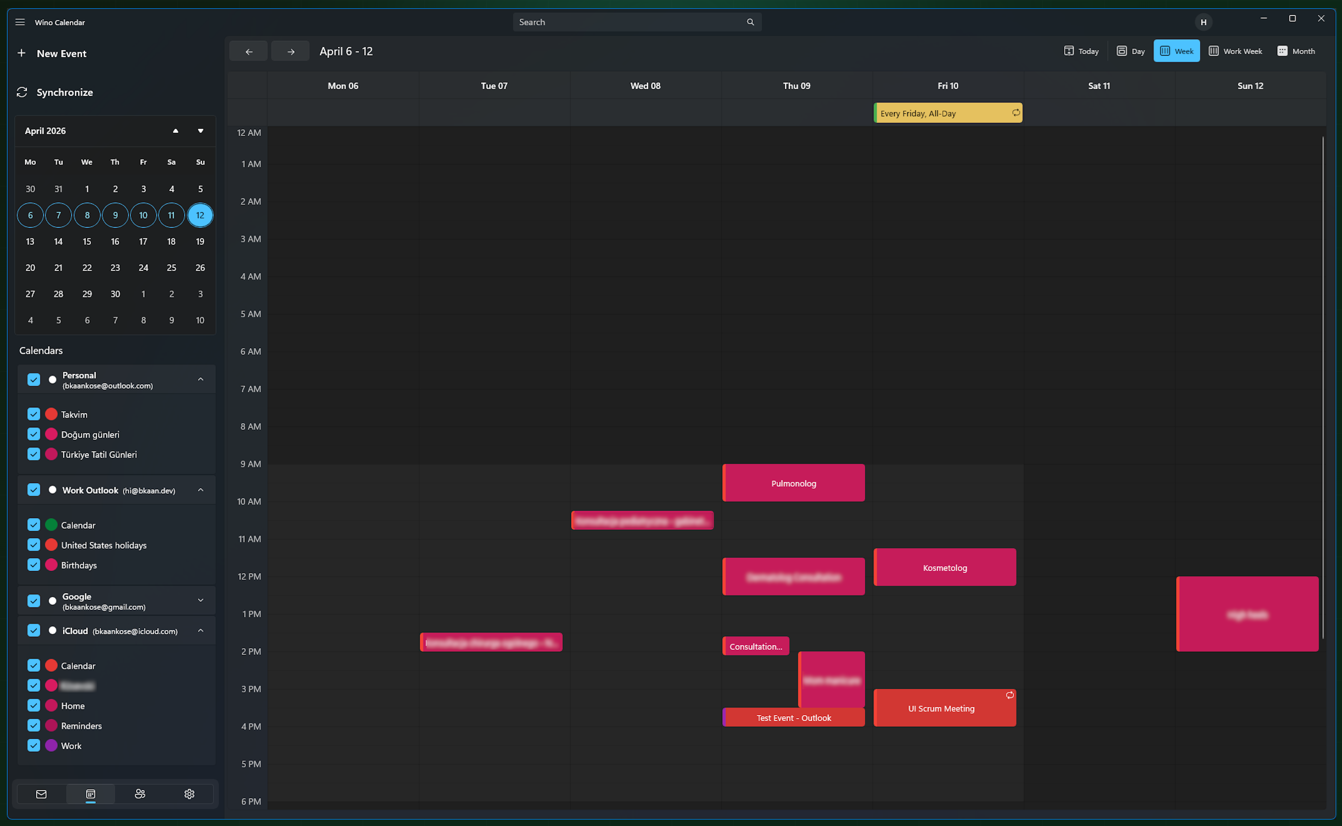
Calendar is integrated as an app mode, alongside Mail, Contacts, and Settings. Wino Mail and Wino Calendar can appear as separate app entries, but they launch the same application in different modes. That keeps the experience unified while still letting calendar feel like its own first-class part of Wino.
Calendar supports Outlook and Google accounts through their native APIs, CalDAV for IMAP accounts such as iCloud, Yahoo, or custom servers, and local-only calendars for users who want calendar events stored only on their own device.
The first version includes working hours, day, week, work-week, and month views, calendar presence like busy, free, and out of office, live notifications, snooze options, and personalization support for themes and backgrounds. The calendar surface is rendered with Skia, which keeps mode switching fast and animations smooth.
More ways to organize mail
Wino v2 also adds new mail organization tools that make it easier to keep important messages close and busy inboxes under control.
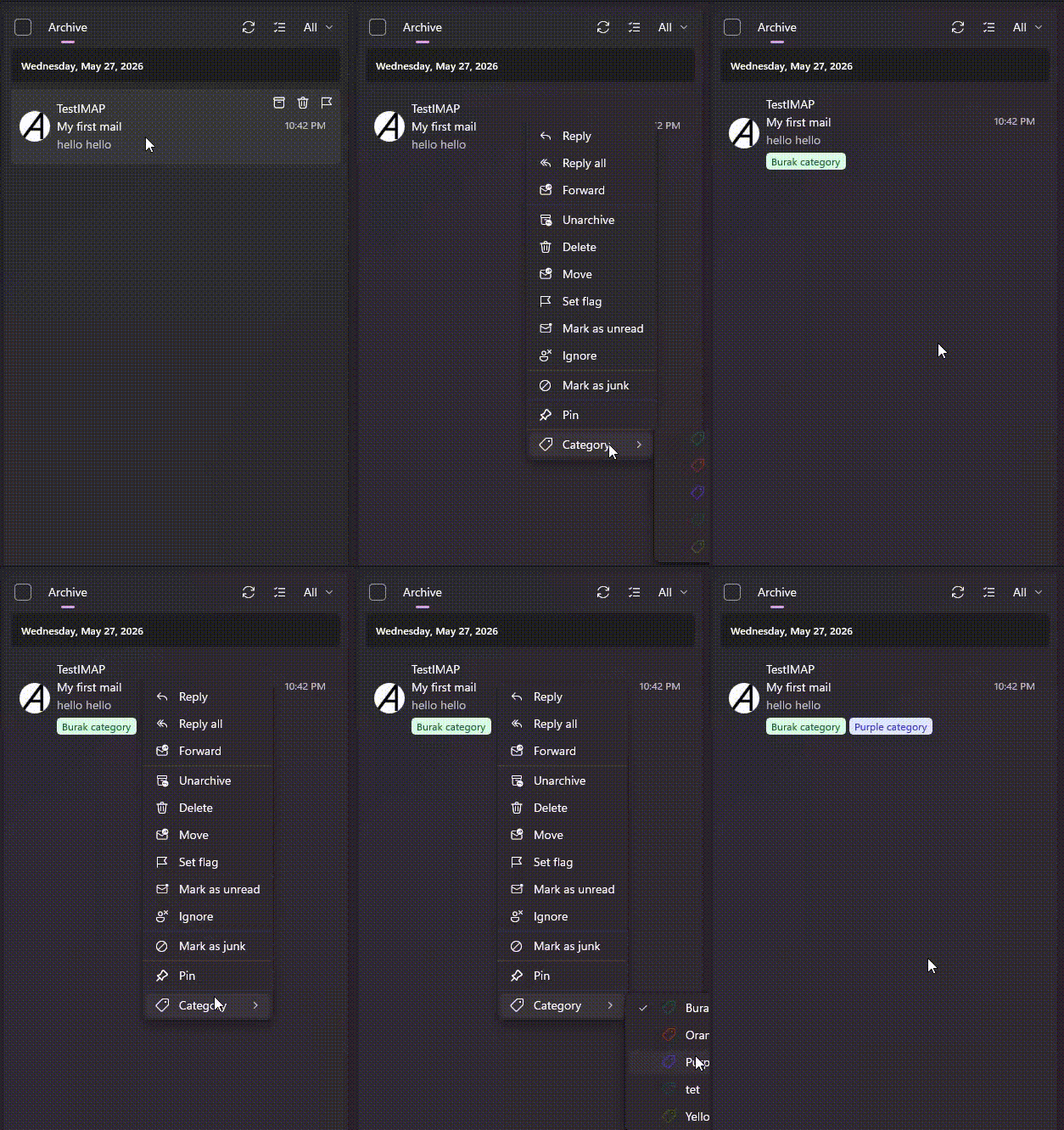
Mail categories give you another way to group, label, and recognize messages. Pinned mails help important messages stay visible instead of getting buried as new mail arrives. Together, they make Wino feel more flexible for people who use email as a task list, archive, project tracker, or daily command center.
Swipe actions you can make your own
Swipe actions are now customizable, so you can decide what quick gestures should do for your workflow.
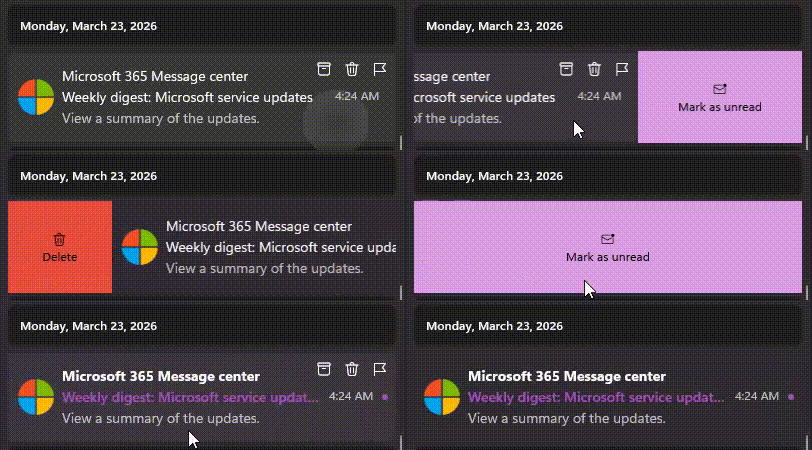
If you archive constantly, delete carefully, flag messages for later, or prefer another action entirely, Wino can now better match the way you handle mail instead of forcing one default behavior on everybody.
Undo for everyday mistakes
Some actions deserve a second chance. Wino v2 adds undo support for deleting mails and sending drafts.
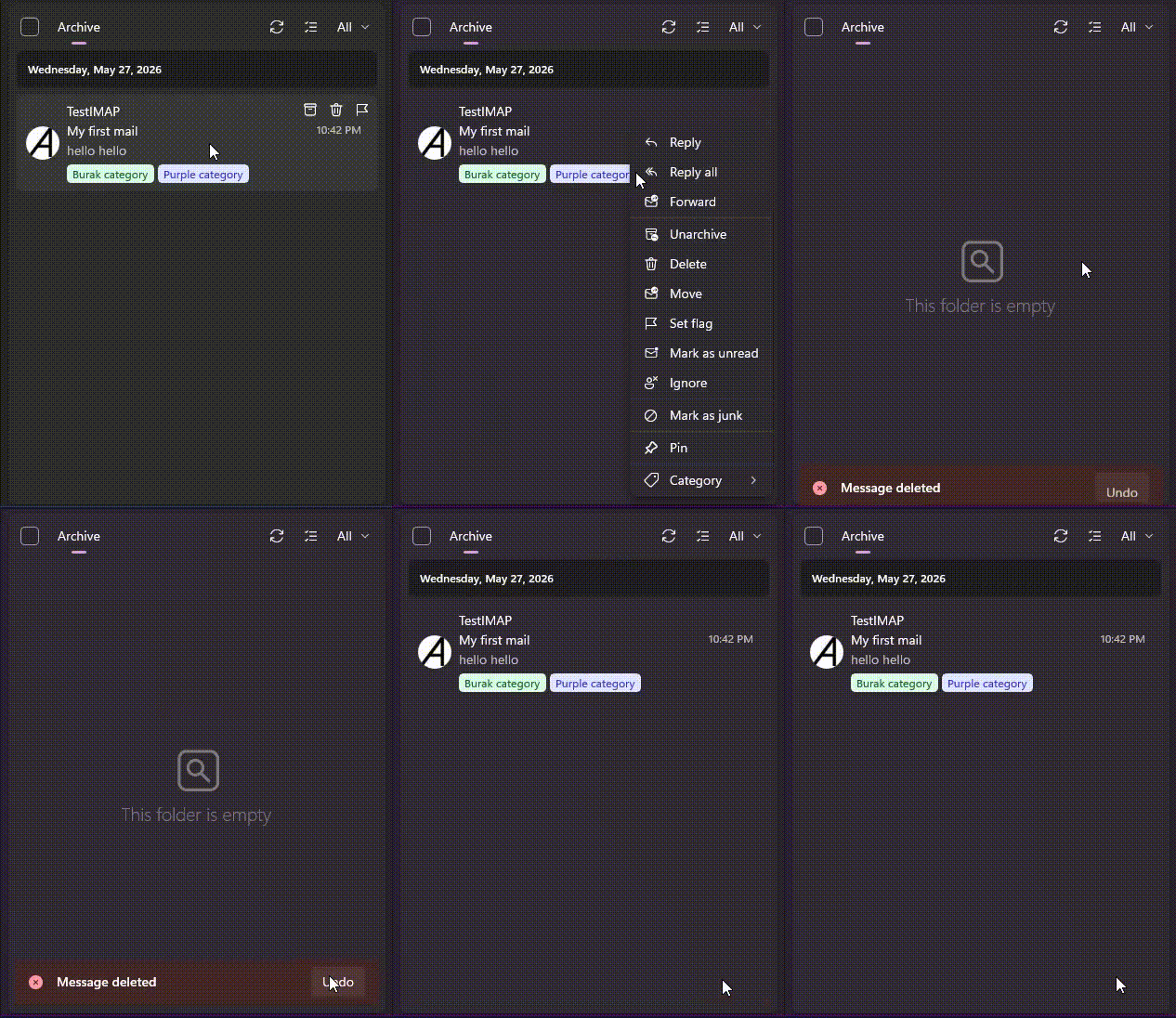
Deleting a message by accident or sending a draft a moment too early should not ruin your flow. Undo gives you a small but important safety net for the actions where a tiny mistake can be frustrating.
Wino Accounts and AI Pack
Wino Accounts are new in v2. They are free, optional, and designed to help you sync preferences, settings, and non-sensitive account details between devices.
You do not need a Wino Account to keep using Wino Mail or Wino Calendar. If you do create one, you choose what to share. Sensitive data such as IMAP or CalDAV passwords, Outlook access tokens, and Gmail access tokens stay on your computer. When you import accounts on another device, you still need to sign in again.
Wino Accounts also make the new AI Pack possible. AI Pack is an optional Microsoft Store subscription that gives monthly credits for AI-powered actions such as translating, rewriting, and summarizing mails. I would love to make these features free for everyone, but the service behind them has a cost, and Wino Accounts make it possible to manage usage responsibly.
Contacts, templates, and keyboard shortcuts
Wino Contacts is now available as another app mode. It gives you a place to manage local contacts created from mail recipients, including names, profile pictures, and details. This is a foundation I want to keep improving in future releases.
Email templates are also here. You can create HTML templates and reuse them while composing mails, which should help with repeated replies, structured messages, support responses, signatures, and any other message you find yourself writing again and again.
Keyboard shortcuts are more flexible too. You can define shortcuts for different actions in different app modes, so the same shortcut can create a new mail in Mail mode and a new event in Calendar mode.
Stability, performance, and polish
Wino Mail was already working well for many daily scenarios, but v2 includes a large amount of work aimed at making it harder to break and easier to trust. Synchronizers and UI flows received many stability improvements. Avatar loading, collections, alias handling, storage management, and background behavior all received attention.
There is also a new mail collection implementation that feels faster and behaves more like the old Windows Mail app in the ways people expect. Storage management is improved, so you can manage mail data per account and clean up older MIME files from disk. Alias handling is better as well, especially for replying and composing from the correct identity.
Personalization also gets better with improved Acrylic and Mica Alt themes using WinUI system backdrop support.
New translations
v2 required hundreds of new translation keys. To avoid leaving supported languages full of missing strings for this release, missing translations were filled in so every supported language can stay usable on day one. Community translation work has always mattered to Wino, and I am grateful for everyone who has helped make the app available to more people.
What comes next
Wino v2 is a big release, but it is not the finish line. Calendar, Contacts, Wino Accounts, templates, categories, pinned mails, and AI features all create new foundations for what comes next.
I am excited to keep improving the app from here: fixing the issues people find, polishing the new surfaces, improving contacts, expanding calendar scenarios, and continuing to make Wino feel like the native Windows mail and calendar experience many of us still want.
Thank you again for supporting the project, testing early builds, contributing code, reporting issues, and sharing Wino with others. I hope v2 feels like a meaningful step forward.